
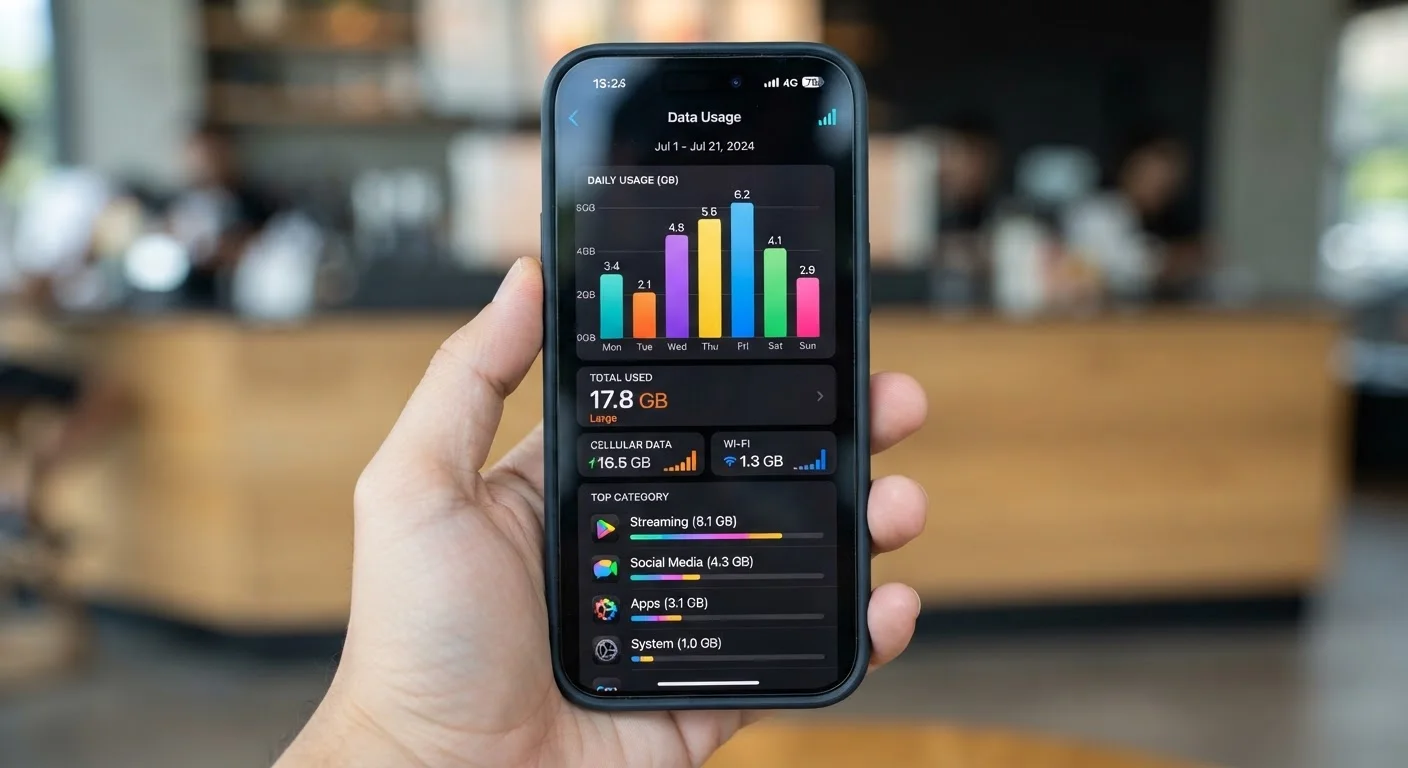
What Actually Counts as Cellular Data
Your cellular data allowance is consumed whenever your phone sends or receives information over your carrier's network - not over Wi-Fi. That distinction sounds simple, but several everyday situations blur the line in ways that catch people off guard.
Any activity that moves content through the air using your carrier's signal draws from your plan: streaming music or video, loading web pages, sending emails with attachments, using navigation apps, posting to social media, and video calls all count. What does not count is traffic that travels over a Wi-Fi connection - even if the app doing the work is the same one you'd use on cellular. Downloading a podcast over your home Wi-Fi uses zero cellular data; downloading the same episode on LTE uses your plan's allowance.
One common source of confusion is background app refresh. Even when you're not actively using an app, your phone periodically checks for updates - new emails, social media notifications, sports scores - and each check consumes a small amount of data. Over a month, dozens of apps doing this silently can add up to several hundred megabytes. Both Android and iOS let you restrict background refresh for individual apps or system-wide, which is one of the simplest ways to reduce unintentional usage. See our guide to app permissions for related context on what apps are doing in the background.
Gray Areas: Wi-Fi Calling, iMessage, and App Updates
A few features behave differently than users expect.
Wi-Fi Calling
Wi-Fi calling routes your phone calls over a Wi-Fi network rather than the cellular voice network. When you use it, the call itself does not count against your data allowance - it runs on a separate system. However, if your phone switches mid-call from Wi-Fi to cellular because the Wi-Fi signal drops, the remainder of that call may use cellular data or cellular minutes depending on your carrier's configuration.
Messaging Apps
Standard SMS text messages travel over the carrier's signaling channel and do not draw from your data bucket. Messages sent through Apple's iMessage or similar internet-based messaging services (WhatsApp, Signal, Google Messages in RCS mode) do use data - although the amount per message is negligible unless you're sending high-resolution photos or videos.
App and System Updates
By default, most phones are configured to download app updates only over Wi-Fi, but this setting can be changed accidentally. Automatic OS updates can be several gigabytes in size. Confirm in your device's settings that large downloads are restricted to Wi-Fi. This is especially relevant for travelers - see our tips on keeping devices safe while traveling, which covers roaming data risks specifically.
Roaming Abroad Changes the Rules
When traveling internationally, your phone may connect to a foreign carrier's network, and data usage is typically billed at much higher roaming rates - or blocked entirely depending on your plan. Wi-Fi calling behavior also varies; some carriers suspend it when roaming. Always verify your carrier's international data policies before travel and consider enabling Airplane Mode with manual Wi-Fi activation to avoid unexpected charges.
How to Monitor and Manage Your Data Accurately
Both Android and iOS include built-in data usage trackers, accessible in Settings under "Cellular" (iOS) or "Network & Internet" (Android). These tools show how much data each app has consumed during the current billing cycle, and they let you set warnings or hard limits.
A few caveats worth knowing: your phone's built-in counter and your carrier's counter may differ slightly because they measure at different points in the data path. Your carrier's figure is what your bill is based on. Check your carrier's app or account portal for the authoritative number, especially as you approach your plan's limit.
For users who frequently exceed their allowance, a useful exercise is reviewing the top five data-consuming apps in Settings and asking whether each use was intentional. Streaming video at high quality is the single largest category for most people - most streaming apps allow you to set a lower video quality when on cellular, which can cut data use dramatically without much visible difference on a phone-sized screen.
Understanding storage and data are related but separate concerns. If you're unsure what's filling up your phone itself rather than your data plan, our breakdown of smartphone storage explains what's taking up space locally. Similarly, differences between Android and iOS affect how each platform handles data controls and background activity.
